How to Onboard a Remote Virtual Assistant
A practical first-30-days plan for onboarding a remote virtual assistant, from access and documentation to feedback loops that build trust quickly.
By Jesel Cura3 min read
Most virtual assistant relationships are decided in the first few weeks. When onboarding is rushed, the assistant guesses, the founder gets frustrated, and both conclude that delegation "doesn't work for us." When onboarding is deliberate, the same assistant becomes someone you can't imagine working without.
Here's a practical plan for the first 30 days.
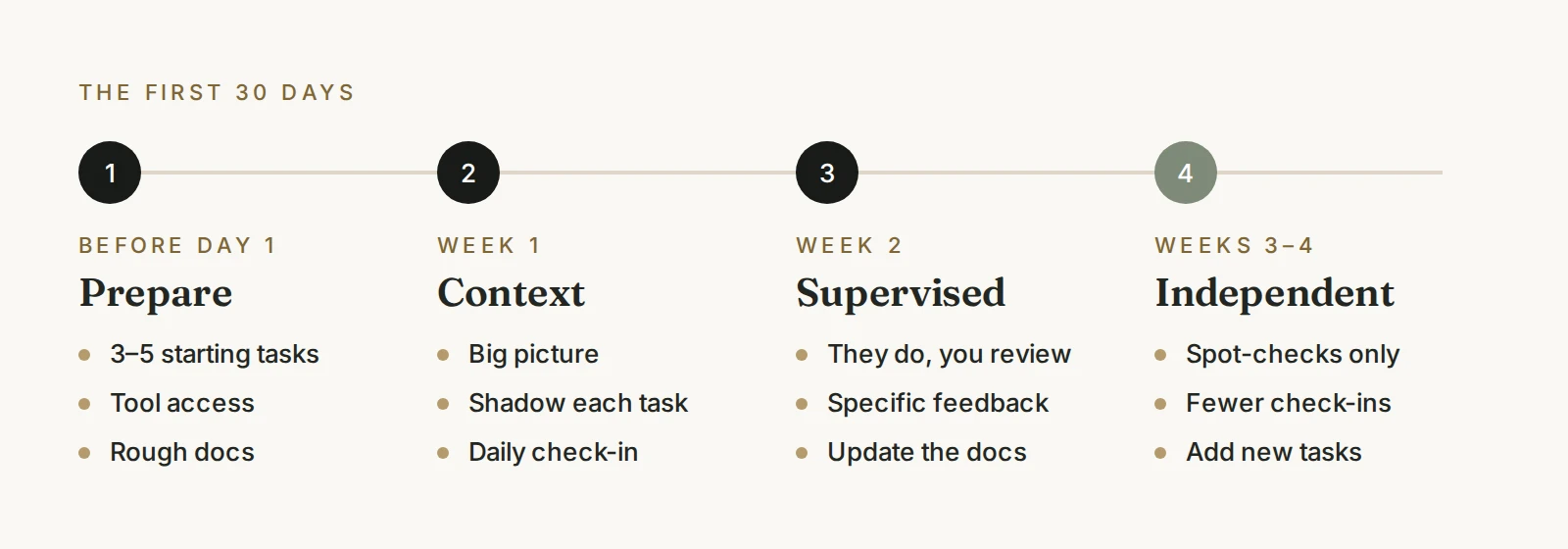
Before day one: prepare three things
1. A starting task list
Write down the specific recurring tasks you want to hand over first. Aim for three to five. Resist the urge to hand over everything at once. A small, well-defined scope builds confidence on both sides.
Not sure what to include? Start with our guide to what a virtual assistant actually handles.
2. Access, set up properly
List every tool your assistant needs and give access with the right permissions:
- Email and calendar (delegated access rather than shared passwords where possible)
- Your project management or task tool
- Shared drives and documents
- Your CRM, help desk, or other systems the tasks touch
- A password manager for any shared credentials
Only grant what the starting tasks require. You can expand access as the scope grows.
3. Basic documentation
For each starting task, write a short note or record a quick screen video showing how you do it today. It doesn't need to be polished. See how to document repetitive processes for a simple method.
Week one: context and shadowing
The goal of week one is understanding, not output.
- Share the big picture. Explain what the business does, who your customers are, and what matters most right now.
- Walk through each task together. Do it once while your assistant watches, then have them do it while you watch.
- Agree on communication. Decide where requests go, how quickly you expect replies, and when to message versus wait for a check-in.
- Set a daily check-in. Ten to fifteen minutes is enough to answer questions early.
Week two: supervised ownership
Now your assistant starts owning the starting tasks, with review.
- Let them do the work end to end, then review it before it goes out.
- Give specific feedback: what to keep doing and what to change.
- Update the documentation together whenever feedback reveals a gap. This is how your SOPs get better.
- Keep a shared list of questions so they're answered once and recorded.
Weeks three and four: independence and expansion
By now, the starting tasks should run with light review.
- Move from reviewing everything to spot-checking.
- Shift daily check-ins to two or three times a week.
- Add one or two new responsibilities, following the same pattern: explain, shadow, supervise, hand over.
- Ask your assistant what's unclear or could be done better. They'll often spot improvements you've stopped noticing.
The feedback loop that makes it work
The single most important habit is fast, specific feedback. Vague frustration ("this isn't quite right") slows everything down. Clear feedback ("replies to existing clients should be warmer and use their first name") compounds quickly.
A short weekly review, using the questions below, keeps it on track.
Common onboarding mistakes
- Handing over everything on day one. Overload leads to mistakes and lost confidence.
- No documentation. If the process lives only in your head, expect inconsistent results.
- Too much access, too early. Grant access as responsibilities grow, not before.
- Disappearing after week one. The first month needs your involvement. It pays back quickly.
- Judging too early. Give the relationship a few weeks before deciding whether it works.
How SageStone handles onboarding
At SageStone, onboarding is built into every engagement. We capture how your work gets done, set up communication rhythms, and stay involved afterward so quality holds. Most engagements begin onboarding within 24 to 72 hours of the discovery call. See how it works, or explore our virtual assistant services.